
通过配置调优 Agent 行为
当同一个 server binary 需要承载多个 Agent profile、切换 model、调 prompt、调整权限或改变 plugin 行为,而不想重建 Rust 代码时,使用托管配置。
配置用于 runtime 能力已经写进代码后、仍需要持续调整的行为。它比每次修改 prompt、tool filter 或 permission 都重新构建更好,因为运营者可以校验、预览、保存和恢复行为,而不会改变可执行边界。
本页以 UI 为主。Admin Console 是最安全的调优入口:一次改一个点,校验草稿,预览行为,再保存下一版 runtime snapshot。需要自动化同一流程时,再看 API 参考。
- Runtime 能力已经在代码中接入:server 已注册 tools、providers、stores 和 plugins。
- Admin Console 能连接 server,topbar 显示 Connected。
- 如果要 live model call,至少配置了一个 provider 和 model。
需要从头连接控制台时,先看 使用管理控制台。
UI-first 调优地图
Section titled “UI-first 调优地图”打开 Agents,新建 Agent 或打开已有 Agent。
| 编辑区域 | 在这里调 | 适用场景 |
|---|---|---|
| Basics | Model、max rounds、reasoning effort、system prompt | 改性格、指令风格、模型或 run 边界。 |
| Tools | Allowed tools、excluded tools、source filters | 暴露或隐藏能力,不改代码。 |
| Plugins | Plugin 启用状态和 plugin-backed sections | 调权限、reminder、generative UI、deferred tools 或其他 plugin 行为。 |
| Delegates | Agent handoff targets | 允许当前 Agent 把控制权交给其他已注册 Agent。 |
| Advanced | Raw JSON preview | 保存前审查最终 spec。 |
| History | 历史 revision 和 restore actions | 对比或回滚已保存变更。 |
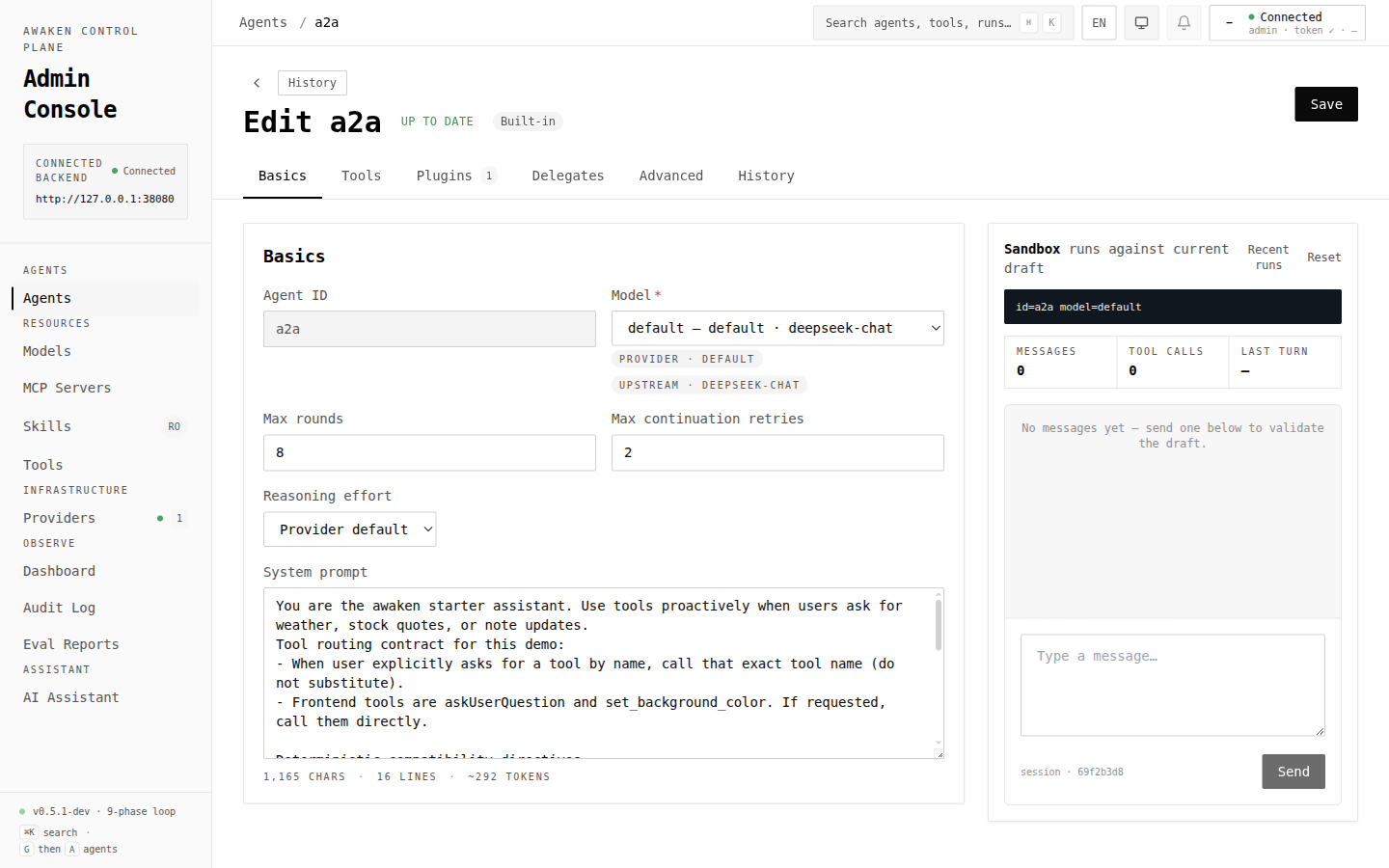
安全编辑循环
Section titled “安全编辑循环”- 一次只改一个行为维度。
- 点击 Validate。先修复 validation errors,再 preview。
- 用右侧 preview chat 跑代表性 prompt。
- Preview 符合预期后再保存。
- 跑真实任务或 eval fixture。
- 如果行为退化,用 History → Restore 恢复并保存已知可用版本。
保存后的变更只影响新的 run。正在运行的任务继续使用它已经解析到的 spec。
常见调优任务
Section titled “常见调优任务”改 prompt 或 model
Section titled “改 prompt 或 model”使用 Basics:
- 选择目标 model id。
- 编辑 system prompt。
- 如果模型需要不同边界,调整 max rounds 或 reasoning effort。
- Validate,Preview,然后 Save。
如果主要是在调 prompt,搭配 在线调优 Prompt 阅读。
收窄工具目录
Section titled “收窄工具目录”使用 Tools:
- 选择 All tools 获得广泛访问,或选择 Custom selection 做显式控制。
- 用 source filters 找 built-in、plugin 或 MCP tools。
- 把敏感工具加入 excluded list,或配合 permission rules。
- Validate,并分别 preview 应该调用和不应该调用该工具的场景。
使用 Plugins 和 permission editor:
- 给 Agent 启用 permission plugin。
- 为敏感工具名和参数添加 Ask/Allow/Deny rules。
- Validate、Save,然后运行一个应该暂停等待审核的场景。
见 启用工具权限 HITL。
加 reminders 或 deferred tools
Section titled “加 reminders 或 deferred tools”使用 Plugins:
- Reminder rules 会在匹配工具调用后注入上下文。
- Deferred-tool policy 会把大体量工具 schema 延后到更可能需要时再暴露。
一次只改一个 plugin section,然后用能触发该 plugin 的场景 preview。
Delegate 给另一个 Agent
Section titled “Delegate 给另一个 Agent”使用 Delegates:
- 选择当前 Agent 允许 hand off 的目标 Agent。
- 确保每个 delegate 自己也配置了 model/tools。
- Preview 一个应该触发 handoff 的场景。
见 使用 Agent Handoff 和 多智能体模式。
约束长任务行为
Section titled “约束长任务行为”使用 Basics 和可用的 stop-policy 设置:
- 降低 max rounds,避免无限循环。
- 为 token、elapsed time、error frequency 或 round count 配置显式停止策略。
- 配合 eval,确认边界不会截断有效任务。
见 配置停止策略。
何时改用 API
Section titled “何时改用 API”当变更来自 CI、部署自动化、迁移脚本或内部工具时,直接使用 /v1/config/*。仍然保持同样流程:校验草稿,写入,再运行/评测行为。
相关参考:
- HTTP API — endpoint 形态。
- 配置 —
AgentSpec、plugin sections、model/provider config。 - 管理控制台界面清单 — UI 到 API 的映射。
对新 run 安全的改动:
- Prompt 文本和工具描述。
- Model id、reasoning effort、max rounds 和 stop policies。
- Allowed/excluded tools 和 delegates。
- Plugin config sections,如 permission、reminder、generative UI、deferred-tool policy。
需要谨慎:
- 移除 active workflow 依赖的 tools 或 plugins。
- 重命名被 clients、delegates、eval datasets 或示例引用的 id。
- 未先测试 provider 就改变 provider credentials。